autosplat



autosplat turns ordinary video into a 3D Gaussian Splat you can fly through in the browser — captured, reconstructed and rendered entirely on your own machine. No cloud, no GPU server, no upload.
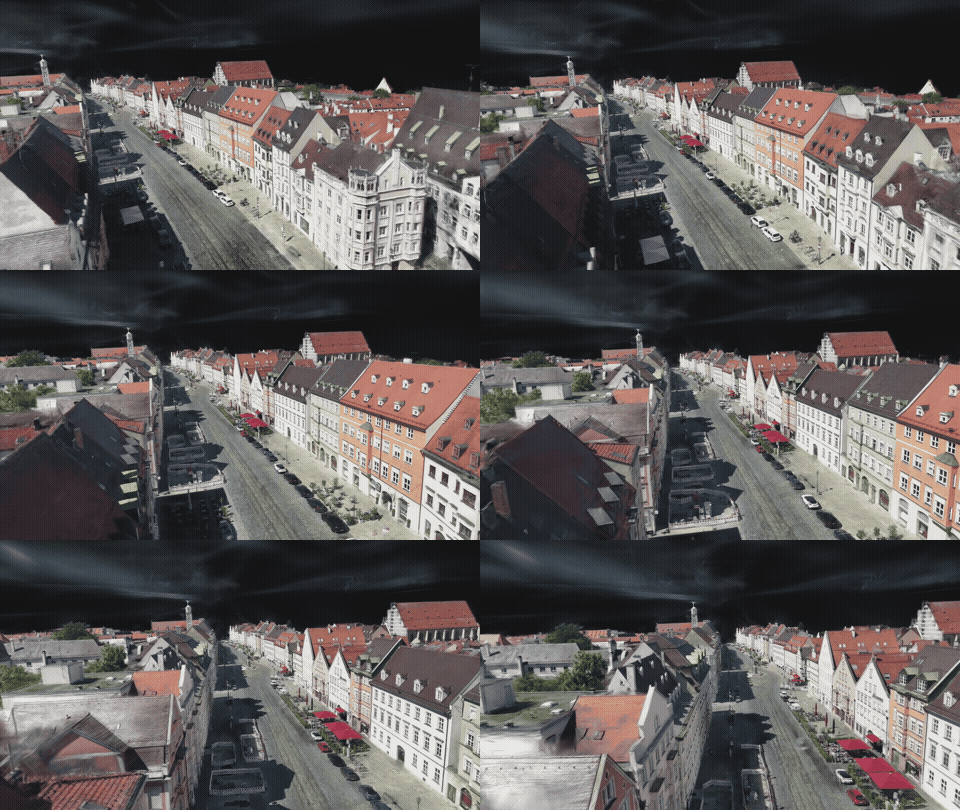
A trained splat flown through in the browser — the max_strasse drone pass,
reconstructed automatically by the pipeline's auto-bisection rescue (490/493 cameras, 99.4 %).
▶ Try the live viewer ·
▶ Full fly-through (YouTube) ·
MP4 ·
WebM
Showcase
 |
 |
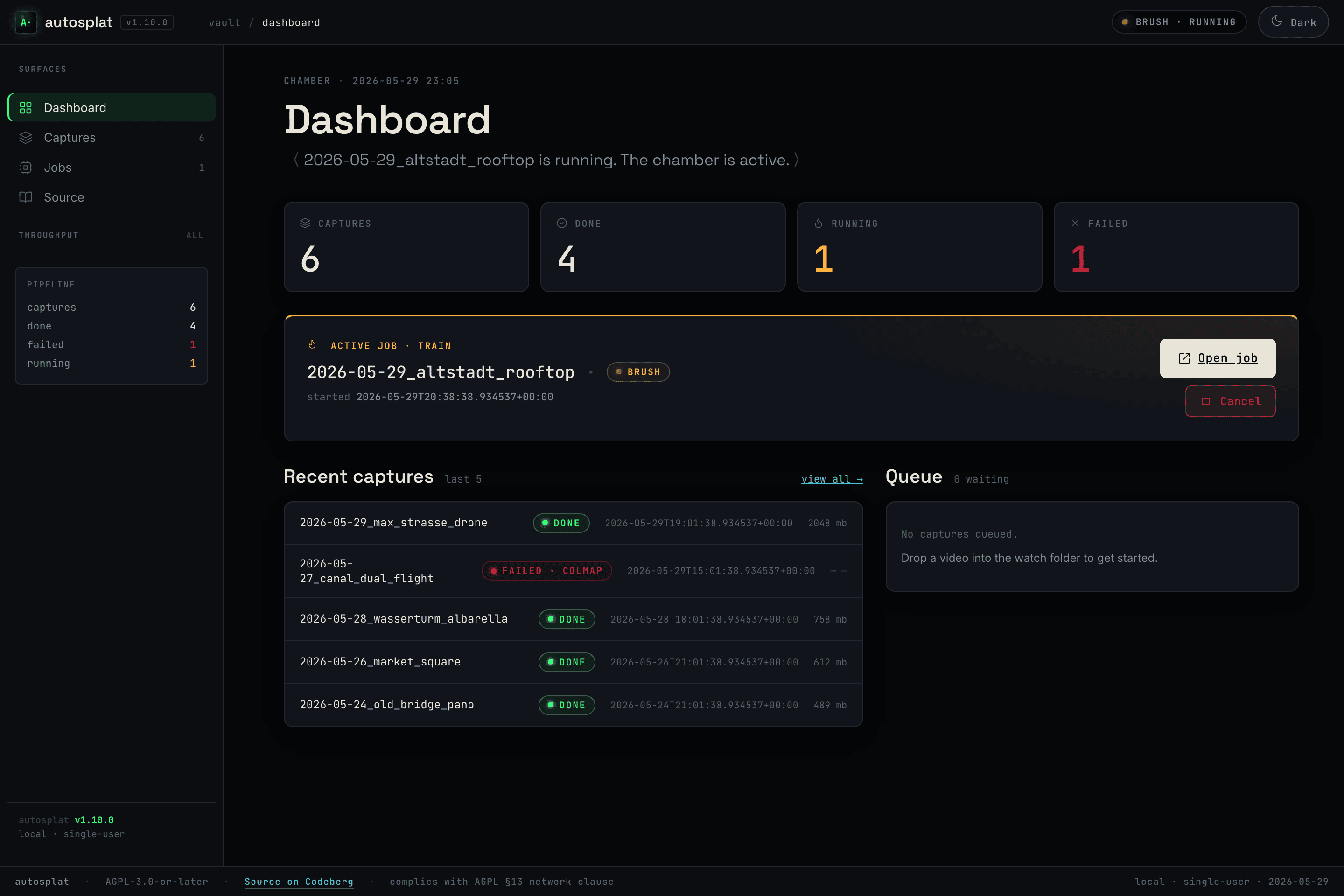 |
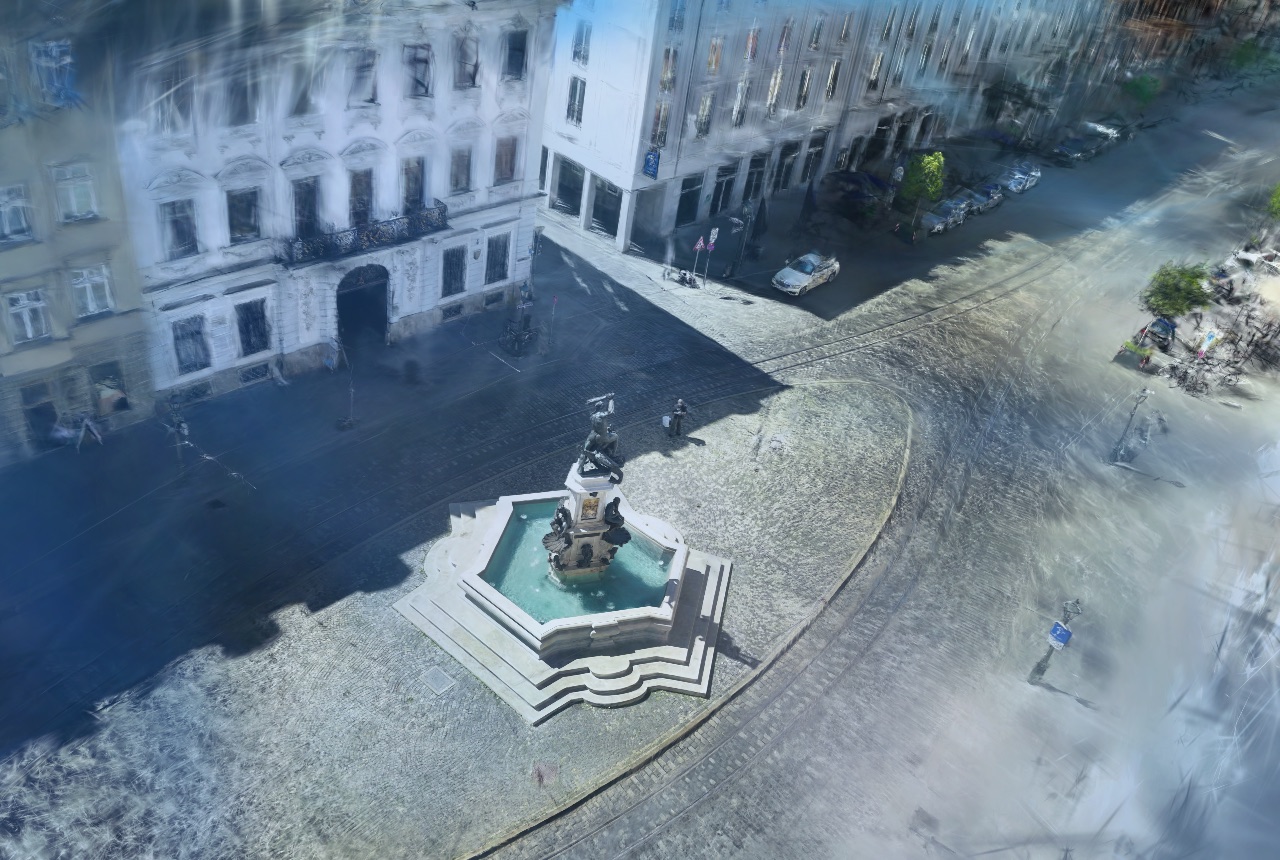
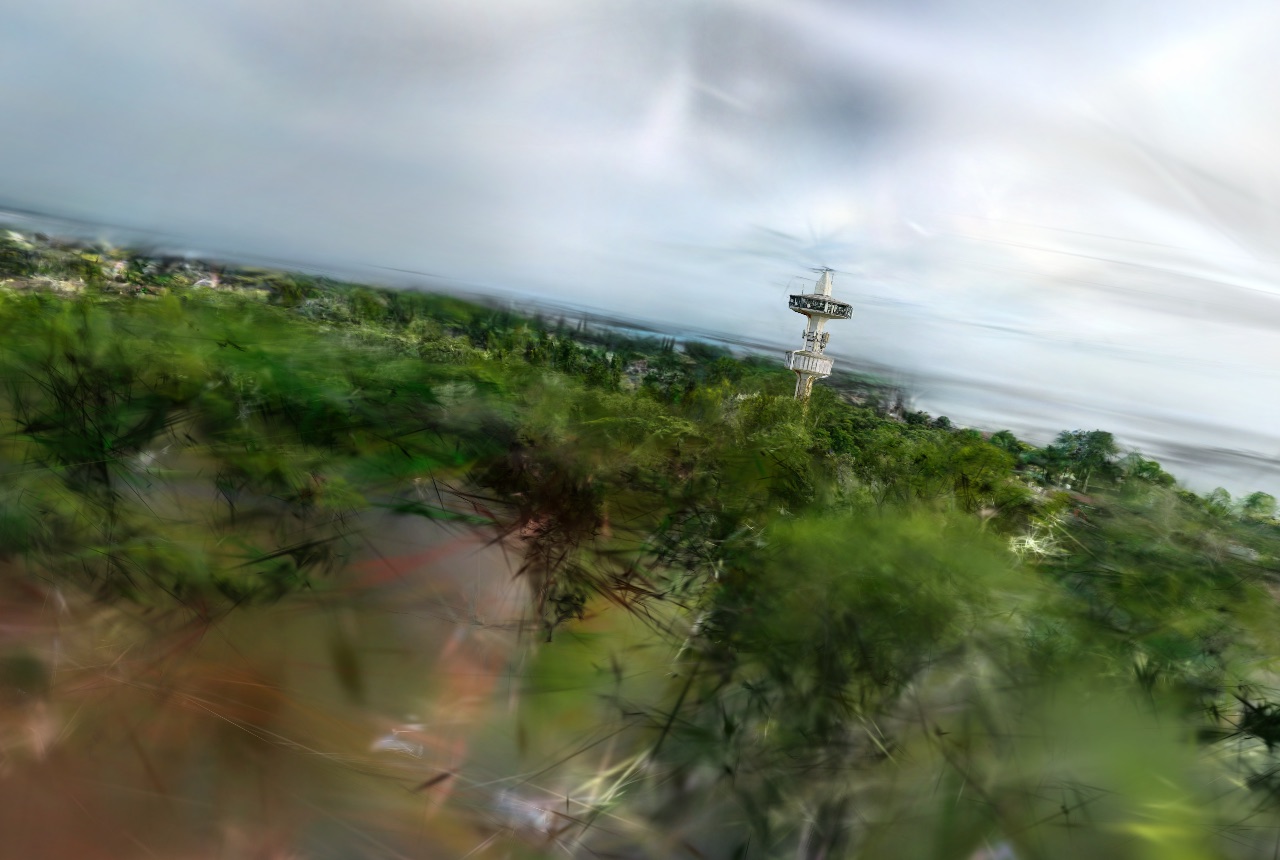
| Herkules — splat in the viewer | Wasserturm — splat in the viewer | Pipeline WebUI — mission control |
Two halves, one repo
autosplat is one product in two parts that share a single file format — the pipeline exports compressed splats, the viewer loads them. That contract is why they live in one repo: cross-cutting changes land in one atomic commit, on one release line.
| Path | Component | What it is |
|---|---|---|
pipeline/ |
Capture → splat pipeline | Drone / handheld video → trained 3D Gaussian Splat. Python · uv · COLMAP · Brush (WebGPU). Apple-Silicon-only, macOS 15+. → pipeline/README.md |
embed/ |
Embeddable splat viewer | Minimal self-contained iframe page (index.html?src=…) with click-to-load gate, auto-framing and a fully vendored PlayCanvas engine — zero external requests. Powers the share bundles. |
viewer/ |
Walking viewer + project site | Static, installable web app that loads and renders .ply / .sog splats locally. Home of the first-person walking mode (collision, heightmap) that nothing else has — the app opens it via Walk through on a finished capture. Also serves the project site. Vanilla HTML/CSS/JS, no build step, vendored engine. → viewer/README.md |
video ──▶ pipeline/  ──exports .ply / .sog──▶  embed/ · viewer/  ──▶ fly through it
          (COLMAP → Brush → compress)          (PlayCanvas / WebGL2)
One door, three roles. Since v1.17.0 AutoSplat.app is the canonical entrance — every step
from import to publication is clickable there, and the three viewers each have one job: SuperSplat
cleans up (the publish review gate), embed/ ships inside share bundles, viewer/ is for walking
through a scene. The CLI is an equal path for automation — including autosplat review and
autosplat share — but never the only way to a step.
Quickstart
# Pipeline — Apple Silicon, macOS 15+
cd pipeline
uv run autosplat doctor            # check ffmpeg / colmap / brush
uv run autosplat <your-video>.mp4  # video → trained splat

# Viewer — any modern browser
cd viewer
./serve.sh                         # → http://localhost:8123/
The published viewer is live on pages.jkaindl.de:
https://pages.jkaindl.de/autosplat/ — drop in a .ply, orbit it, or
▶ walk through it in first-person.
Each component documents its own deep setup, CLI, and configuration in its own README — this page is just the map.
Develop & test
cd pipeline && uv run pytest -q     # 448 pipeline unit tests
cd viewer   && ./tests/run.sh       # 77 viewer unit tests (+ opt-in e2e)
Publish the viewer to pages.jkaindl.de (snapshot of viewer/ rsynced to the pages host):
Repo layout & versioning
autosplat/
├─ README.md · CHANGELOG.md · AGENTS.md      product level (this repo)
├─ LICENSE · LICENSING.md · CLA.md · SECURITY.md · CITATION.cff · CONTRIBUTING.md
├─ scripts/deploy-pages.sh                   viewer → pages.jkaindl.de
├─ pipeline/                                 capture→splat pipeline (own README/CHANGELOG)
└─ viewer/                                   splat viewer PWA (own README/CHANGELOG)
One shared version line starting at v1.12.0 covers both halves. Pre-merge
history is preserved verbatim — historical tags are namespaced pipeline-v* /
viewer-v*, and git log --follow reaches the full history inside each
subfolder. Per-component release notes:
pipeline/CHANGELOG.md ·
viewer/CHANGELOG.md · product-level
CHANGELOG.md.
License
AGPL-3.0-or-later, with a dual-licensing / CLA model — see
LICENSING.md and CLA.md. Need terms other than AGPL
(a closed-source product, an App Store build) or a commissioned capture? →
code@jkaindl.de.
Moved here in 2026-06. Previously two repos —
video-to-3d-gaussian-splat(pipeline) andautosplat-viewer(viewer), now archived. This monorepo is the canonical home; it is also mirrored to github.com/johannes-kaindl/autosplat.
Arbeitsregeln (AGENTS.md)
Workspace-Standards (maintainer-lokal): Die verbindliche Leitkonvention steht in
_docs/CONVENTIONS.mdim Multi-Projekt-Workspace des Maintainers,../_docsrelativ zu diesem Repo — nicht Teil dieses Repos, ignorieren falls im Klon nicht vorhanden. Modell comply-or-explain.
Guidance for AI coding agents working in this monorepo.
What this is
autosplat ist ein Monorepo der beiden zusammengehörigen AutoSplat-Komponenten:
| Pfad | Inhalt | Eigene AGENTS.md |
|---|---|---|
pipeline/ |
Lokale Pipeline: Drohnen-/Handheld-Video → trainierter 3D Gaussian Splat (Python, uv, Apple-Silicon-only) | pipeline/AGENTS.md |
viewer/ |
Splat-Viewer mit Walking-Mode (First-Person + Kollision) und die Projekt-Website auf pages.jkaindl.de (Vanilla HTML/CSS/JS, kein Build-Step) | viewer/AGENTS.md |
embed/ |
Minimaler, embed-fähiger Splat-Viewer: iframe-Seite mit vendored Engine, zero-external | embed/AGENTS.md |
Regel: Für Arbeit innerhalb einer Komponente gilt deren eigene AGENTS.md — dort stehen Befehle, Test-Pflichten, Commit-Stil und Architektur-Notizen. Diese Datei regelt die Produkt-Ebene darüber.
Rollen-Charta (ratifiziert 2026-07-29, nicht neu diskutieren)
AutoSplat.app ist die kanonische Tür. Jeder Schritt von Import bis Veröffentlichung muss dort klickbar sein. Die CLI ist gleichwertig für Automatisierung und Batch, darf aber nie der einzige Weg zu einem Schritt sein — und umgekehrt.
Die drei Viewer überlappen sich nur beim reinen Anschauen. Jeder hat genau eine Rolle:
| Artefakt | Rolle |
|---|---|
SuperSplat (pipeline/target/supersplat/dist, gebündelt) |
bereinigen — der Editor des Review-Gates |
embed/ |
teilen — zero-external Runtime in Share-Bundles |
viewer/ |
begehen — Walking-Mode; dazu die Projekt-Website |
Ein vierter Viewer ist eine Design-Entscheidung, kein Detail. Wer einen hinzufügt, trägt ihn hier ein oder lässt es.
Gebündelte Ressourcen, wie die App sie auflöst — der WebUI-Mount
(resources.viewer_status/_root_for) und alles, was create_app und das gepackte
Bundle anfassen — laufen ausschließlich über resources.bundled_path(), nie gegen
Path.cwd(). Ein Finder-Start hat kein sinnvolles CWD; genau daran fehlte jeder DMG bis
v1.16.0 der Review-Viewer. Reine CLI-Pfade (autosplat serve --with-supersplat, die
Preflight-Warnung vor process/resume/add-video/rescue, deren Auto-Open am Ende)
dürfen einen relativ gesetzten supersplat_dist_path-Override weiterhin gegen das
Arbeitsverzeichnis auflösen — für ein Terminal-Kommando ist das erwartetes Verhalten,
kein Bug; sie laufen nie im gepackten Bundle.
Working in the monorepo
- Ein Git-Repo für beides — repo-übergreifende Änderungen (z. B. Export-Format der
Pipeline ↔ Loader des Viewers) gehören in einen atomaren Commit und werden im
Root-
CHANGELOG.mdvermerkt; betrifft eine Änderung nur eine Komponente, deren Sub-CHANGELOG bleibt die Detailebene. - Schnittstelle: die Pipeline exportiert komprimierte
.ply-/Splat-Dateien, die der Viewer lädt. Format-Änderungen auf einer Seite immer gegen die andere prüfen. - Versionierung: eine gemeinsame Version ab
v1.12.0(ein Release-TagvX.Y.Zfür beides). Historische Tags sindpipeline-v*/viewer-v*. - Tests vor jedem Commit:
cd pipeline && uv run pytest -qbzw.cd viewer && ./tests/run.shbzw.cd embed && ./tests/run.sh. - Pages-Deploy des Viewers:
scripts/deploy-pages.sh(rsync-Snapshot vonviewer/aus committed HEAD nachpages.jkaindl.de; ersetzt den alten Codeberg-Pages-Flow). Live:https://pages.jkaindl.de/autosplat/.
Memory
Dieser Abschnitt beschreibt das persönliche Claude-Code-Setup des Maintainers auf seiner eigenen Maschine — für andere Klone/Contributor irrelevant, einfach überspringen.
- SDD-Artefakte (seit 2026-07-16): Cockpit, nicht Repo — Specs/Plans/Task-Reports leben im
Coding-Cockpit des Maintainers (
$VAULT/25_Coding/autosplat/_SDD/, CORE-META-14, maintainer-lokal). Sie tragen Arbeitskontext (Vault-Pfade, Schwester-Repo-Interna), der in einem public Repo niemandem nützt. Das Repo behält die Design-Essenz in dieser Datei +CHANGELOG.md. - Alt-Bestand:
pipeline/docs/superpowers/{specs,plans}/undviewer/docs/superpowers/plans/sind eingefroren — nichts Neues dort ablegen. - Nie im Repo: absolute Pfade außerhalb des Repos (
/Users/…, Vault-Pfade) — Platzhalter nutzen ($VAULT/…,~/…, repo-relativ). Herkunftsnachweise als Repo-Name +Datei:Zeilesind dagegen erwünscht. - Session-Handoff (sessionübergreifend, in diesem Repo):
.remember/—remember.md(Handoff),now.md(Buffer),today-*.md,recent.md,archive.md,core-memories.md..remember/ist Arbeitspuffer und gitignored. - Persistentes Memory (außerhalb des Repos, nur auf der Maintainer-Maschine vorhanden):
~/.claude/projects/-Users-Shared-code-autosplat/memory/ - Coding-Cockpit (Status/Tasks/History) im privaten Obsidian-Vault des Maintainers:
$VAULT/25_Coding/autosplat/autosplat.md.
Einstiegspunkte
| Art | Name | Ziel |
|---|---|---|
python-script |
autosplat |
autosplat.cli:app |
Modul-Abhängigkeiten
graph LR
    pipeline_src_autosplat___main__ --> pipeline_src_autosplat_cli
    pipeline_src_autosplat_bisection --> pipeline_src_autosplat_config
    pipeline_src_autosplat_bisection --> pipeline_src_autosplat_logging
    pipeline_src_autosplat_bisection --> pipeline_src_autosplat_pipeline
    pipeline_src_autosplat_bisection --> pipeline_src_autosplat_preprocess
    pipeline_src_autosplat_bisection --> pipeline_src_autosplat_quality
    pipeline_src_autosplat_bisection --> pipeline_src_autosplat_sfm
    pipeline_src_autosplat_bisection --> pipeline_src_autosplat_watcher
    pipeline_src_autosplat_cli --> pipeline_src_autosplat_bisection
    pipeline_src_autosplat_cli --> pipeline_src_autosplat_cleanup
    pipeline_src_autosplat_cli --> pipeline_src_autosplat_compress
    pipeline_src_autosplat_cli --> pipeline_src_autosplat_config
    pipeline_src_autosplat_cli --> pipeline_src_autosplat_desktop
    pipeline_src_autosplat_cli --> pipeline_src_autosplat_doctor
    pipeline_src_autosplat_cli --> pipeline_src_autosplat_logging
    pipeline_src_autosplat_cli --> pipeline_src_autosplat_migration
    pipeline_src_autosplat_cli --> pipeline_src_autosplat_pipeline
    pipeline_src_autosplat_cli --> pipeline_src_autosplat_viewer
    pipeline_src_autosplat_cli --> pipeline_src_autosplat_watcher
    pipeline_src_autosplat_cli --> pipeline_src_autosplat_webui
    pipeline_src_autosplat_compress --> pipeline_src_autosplat_logging
    pipeline_src_autosplat_desktop --> pipeline_src_autosplat_config
    pipeline_src_autosplat_desktop --> pipeline_src_autosplat_doctor
    pipeline_src_autosplat_desktop --> pipeline_src_autosplat_logging
    pipeline_src_autosplat_desktop --> pipeline_src_autosplat_webui
    pipeline_src_autosplat_doctor --> pipeline_src_autosplat_compress
    pipeline_src_autosplat_doctor --> pipeline_src_autosplat_config
    pipeline_src_autosplat_export --> pipeline_src_autosplat_config
    pipeline_src_autosplat_export --> pipeline_src_autosplat_logging
    pipeline_src_autosplat_notification --> pipeline_src_autosplat_logging
    pipeline_src_autosplat_obsidian --> pipeline_src_autosplat_config
    pipeline_src_autosplat_obsidian --> pipeline_src_autosplat_logging
    pipeline_src_autosplat_pipeline --> pipeline_src_autosplat_bisection
    pipeline_src_autosplat_pipeline --> pipeline_src_autosplat_compress
    pipeline_src_autosplat_pipeline --> pipeline_src_autosplat_config
    pipeline_src_autosplat_pipeline --> pipeline_src_autosplat_export
    pipeline_src_autosplat_pipeline --> pipeline_src_autosplat_logging
    pipeline_src_autosplat_pipeline --> pipeline_src_autosplat_notification
    pipeline_src_autosplat_pipeline --> pipeline_src_autosplat_obsidian
    pipeline_src_autosplat_pipeline --> pipeline_src_autosplat_preflight
    pipeline_src_autosplat_pipeline --> pipeline_src_autosplat_preprocess
    pipeline_src_autosplat_pipeline --> pipeline_src_autosplat_progress
    pipeline_src_autosplat_pipeline --> pipeline_src_autosplat_quality
    pipeline_src_autosplat_pipeline --> pipeline_src_autosplat_sfm
    pipeline_src_autosplat_pipeline --> pipeline_src_autosplat_train
    pipeline_src_autosplat_pipeline --> pipeline_src_autosplat_watcher
    pipeline_src_autosplat_preflight --> pipeline_src_autosplat_logging
    pipeline_src_autosplat_preprocess --> pipeline_src_autosplat_config
    pipeline_src_autosplat_preprocess --> pipeline_src_autosplat_logging
    pipeline_src_autosplat_quality --> pipeline_src_autosplat_config
    pipeline_src_autosplat_quality --> pipeline_src_autosplat_logging
    pipeline_src_autosplat_quality --> pipeline_src_autosplat_sfm
    pipeline_src_autosplat_sfm --> pipeline_src_autosplat_config
    pipeline_src_autosplat_sfm --> pipeline_src_autosplat_logging
    pipeline_src_autosplat_train --> pipeline_src_autosplat_config
    pipeline_src_autosplat_train --> pipeline_src_autosplat_logging
    pipeline_src_autosplat_viewer --> pipeline_src_autosplat_config
    pipeline_src_autosplat_viewer --> pipeline_src_autosplat_logging
    pipeline_src_autosplat_watcher --> pipeline_src_autosplat_config
    pipeline_src_autosplat_watcher --> pipeline_src_autosplat_logging
    pipeline_src_autosplat_watcher --> pipeline_src_autosplat_quality
    pipeline_src_autosplat_watcher --> pipeline_src_autosplat_train
    pipeline_src_autosplat_webui --> pipeline_src_autosplat_webui_app
    pipeline_src_autosplat_webui_app --> pipeline_src_autosplat_webui_jobs_runner
    pipeline_src_autosplat_webui_app --> pipeline_src_autosplat_webui_routes_captures
    pipeline_src_autosplat_webui_app --> pipeline_src_autosplat_webui_routes_dashboard
    pipeline_src_autosplat_webui_app --> pipeline_src_autosplat_webui_routes_health
    pipeline_src_autosplat_webui_app --> pipeline_src_autosplat_webui_routes_jobs
    pipeline_src_autosplat_webui_app --> pipeline_src_autosplat_webui_routes_partials
    pipeline_src_autosplat_webui_app --> pipeline_src_autosplat_webui_routes_source
    pipeline_src_autosplat_webui_app --> pipeline_src_autosplat_webui_routes_storage
    pipeline_src_autosplat_webui_app --> pipeline_src_autosplat_webui_routes_system
pipeline_src_autosplat_webui_app --> pipeline_src_autosplat_webui_share_runnerQuelldateien
embed/js/autoframe.jsembed/js/main.jsembed/js/params.jsembed/js/viewer.jsembed/serve.shembed/tests/e2e/embed-smoke.test.mjsembed/tests/e2e/pose-authoring.test.mjsembed/tests/run.shembed/tests/unit/autoframe.test.mjsembed/tests/unit/params.test.mjsembed/tests/unit/pose.test.mjspipeline/docs/brand/marks.jspipeline/docs/brand/render_marks.mjspipeline/packaging/autosplat_app.pypipeline/scripts/build_app.shpipeline/scripts/build_brand_assets.shpipeline/scripts/fetch_brush.shpipeline/scripts/install_deps.shpipeline/scripts/install_splat.shpipeline/scripts/install_splat_alias.shpipeline/scripts/setup_supersplat.shpipeline/src/autosplat/__init__.pypipeline/src/autosplat/__main__.pypipeline/src/autosplat/bisection.pypipeline/src/autosplat/cleanup.pypipeline/src/autosplat/cli.pypipeline/src/autosplat/compress.pypipeline/src/autosplat/config.pypipeline/src/autosplat/desktop.pypipeline/src/autosplat/doctor.pypipeline/src/autosplat/export.pypipeline/src/autosplat/failure.pypipeline/src/autosplat/lifecycle.pypipeline/src/autosplat/logging.pypipeline/src/autosplat/migration.pypipeline/src/autosplat/notification.pypipeline/src/autosplat/obsidian.pypipeline/src/autosplat/pipeline.pypipeline/src/autosplat/preflight.pypipeline/src/autosplat/preprocess.pypipeline/src/autosplat/progress.pypipeline/src/autosplat/quality.pypipeline/src/autosplat/resources.pypipeline/src/autosplat/sfm.pypipeline/src/autosplat/train.pypipeline/src/autosplat/viewer.pypipeline/src/autosplat/watcher.pypipeline/src/autosplat/webui/__init__.pypipeline/src/autosplat/webui/app.pypipeline/src/autosplat/webui/jobs_runner.pypipeline/src/autosplat/webui/progress_view.pypipeline/src/autosplat/webui/routes/__init__.pypipeline/src/autosplat/webui/routes/captures.pypipeline/src/autosplat/webui/routes/dashboard.pypipeline/src/autosplat/webui/routes/health.pypipeline/src/autosplat/webui/routes/jobs.pypipeline/src/autosplat/webui/routes/partials.pypipeline/src/autosplat/webui/routes/source.pypipeline/src/autosplat/webui/routes/storage.pypipeline/src/autosplat/webui/routes/system.pypipeline/src/autosplat/webui/share.pypipeline/src/autosplat/webui/share_runner.pypipeline/src/autosplat/webui/state.pypipeline/src/autosplat/webui/static/js/htmx.min.jspipeline/tests/conftest.pypipeline/tests/test_bisection.pypipeline/tests/test_cleanup.pypipeline/tests/test_cli_cleanup_intermediates.pypipeline/tests/test_cli_cleanup_rescue.pypipeline/tests/test_cli_migrate_storage.pypipeline/tests/test_cli_preflight.pypipeline/tests/test_cli_rescue.pypipeline/tests/test_cli_review.pypipeline/tests/test_cli_serve.pypipeline/tests/test_cli_share.pypipeline/tests/test_compress.pypipeline/tests/test_config.pypipeline/tests/test_desktop.pypipeline/tests/test_doctor.pypipeline/tests/test_e2e.pypipeline/tests/test_export.pypipeline/tests/test_failure.pypipeline/tests/test_lifecycle.pypipeline/tests/test_migration.pypipeline/tests/test_notification.pypipeline/tests/test_obsidian.pypipeline/tests/test_packaging.pypipeline/tests/test_pipeline.pypipeline/tests/test_preflight.pypipeline/tests/test_preprocess.pypipeline/tests/test_progress.pypipeline/tests/test_quality.pypipeline/tests/test_resources.pypipeline/tests/test_sfm.pypipeline/tests/test_train.pypipeline/tests/test_viewer.pypipeline/tests/test_watcher.pypipeline/tests/webui/__init__.pypipeline/tests/webui/conftest.pypipeline/tests/webui/test_app.pypipeline/tests/webui/test_captures.pypipeline/tests/webui/test_jobs.pypipeline/tests/webui/test_partials.pypipeline/tests/webui/test_review_routes.pypipeline/tests/webui/test_share.pypipeline/tests/webui/test_share_routes.pypipeline/tests/webui/test_share_runner.pypipeline/tests/webui/test_storage_routes.pypipeline/tests/webui/test_system_routes.pypipeline/tests/webui/test_ui_smoke.pypipeline/tests/webui/test_walk_route.pyscripts/deploy-pages.shviewer/js/app.jsviewer/js/collision/collision-mode.jsviewer/js/collision/editor.jsviewer/js/collision/marching-cubes.jsviewer/js/collision/mc-tables.jsviewer/js/collision/mesh-bvh.jsviewer/js/collision/persist.jsviewer/js/collision/voxelize.jsviewer/js/controls.jsviewer/js/dropzone.jsviewer/js/heightmap.jsviewer/js/hud.jsviewer/js/landing.jsviewer/js/viewer.jsviewer/js/walking.jsviewer/serve.shviewer/service-worker.jsviewer/tests/e2e/collision-smoke.test.mjsviewer/tests/e2e/walking-smoke.test.mjsviewer/tests/run.shviewer/tests/unit/controls.test.mjsviewer/tests/unit/editor.test.mjsviewer/tests/unit/heightmap.test.mjsviewer/tests/unit/marching-cubes.test.mjsviewer/tests/unit/mc-tables.test.mjsviewer/tests/unit/mesh-bvh.test.mjsviewer/tests/unit/persist.test.mjsviewer/tests/unit/sanity.test.mjsviewer/tests/unit/vendor.test.mjsviewer/tests/unit/voxelize.test.mjs