podcast-to-youtube
English · Deutsch


Automated end-to-end pipeline: podcast audio → finished YouTube video, running locally on Apple Silicon.
Target platform: Apple Silicon Mac, macOS 15+. Mac-only by design.
Status: v1.0.0 — first public release. The full four-phase pipeline runs end-to-end; the WebGUI is the primary interface. Mac Silicon, AGPL-3.0.
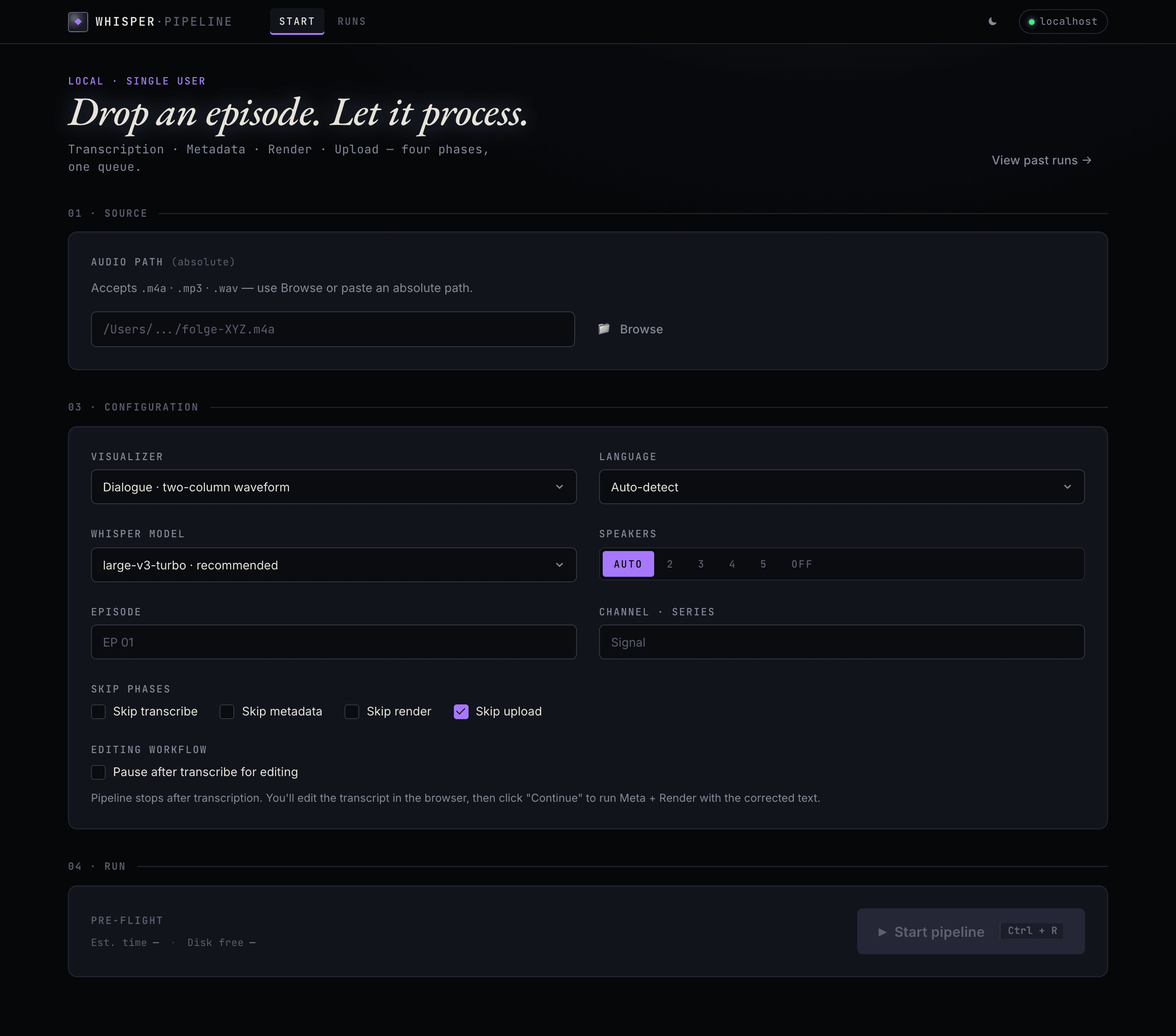
Drop an episode, pick the options, start the pipeline — everything runs locally.
About
A single audio file (.m4a / .mp3 / .wav) becomes a private YouTube video. Everything runs locally on Mac hardware — transcription with WhisperX, metadata generation with a local MLX-served LLM, video rendering with Remotion. The only network call is the YouTube upload itself.
Release status
For full per-release notes see CHANGELOG.md.
| Version | Date | Headline |
|---|---|---|
| v1.0.0 | 2026-05-22 | Initial public release — four-phase pipeline (transcribe · metadata · render · upload), WebGUI + TUI, 64 tests. |
Features
Four phases, one pipeline:
flowchart TD
    A[Audio · m4a / mp3 / wav] --> B[Transcribe · WhisperX]
    B --> C[Metadata · local LLM]
    C --> D[Render · Remotion]
    D --> E[Upload · YouTube Data API]
E --> F[Private video]- Transcribe — WhisperX produces a word-level transcript (JSON / SRT / TXT) with speaker labels.
- Metadata — a local MLX LLM generates the YouTube title, description, tags and chapters.
- Render — Remotion renders a 1920×1080 MP4 with an audio visualiser.
- Upload — the YouTube Data API v3 publishes the video as private. Upload is a manual, explicit step.
Requirements
- macOS on Apple Silicon — the pipeline is built around WhisperX and a locally served MLX model.
- uv for the Python environment · Node.js for the Remotion renderer.
- ffmpeg — audio probing and rendering (
brew install ffmpeg). - A local, OpenAI-compatible LLM server on port 8080, serving the model that writes the metadata — see the central LLM setup guide. Which model it serves is configured via
MLX_MODEL(see Configuration). - A Google Cloud OAuth client —
client_secrets.json(Desktop App, with the YouTube Data API v3 enabled).upload_youtube.pyprints the Google Cloud setup steps if the file is missing.
Install
git clone https://git.jkaindl.de/jkaindl/podcast-to-youtube.git
cd podcast-to-youtube

# Python environment (uv reads pyproject.toml + uv.lock, creates .venv)
uv sync                       # add --extra transcribe for the WhisperX phase
source .venv/bin/activate

# system tools
brew install ffmpeg

# Remotion dependencies (once)
cd visualizer && npm install && cd ..

# YouTube OAuth (once — needs a real terminal for the browser flow)
python auth_youtube.py

# launch the WebGUI
python webgui.py
The WebGUI opens at http://localhost:8765.
Usage
Two frontends onto the same pipeline: the WebGUI is the primary interface, the CLI runs the same four phases headless. Both read and write the same output/<stem>/run-state.json, so a run started in one can be inspected in the other.
WebGUI
python webgui.py starts a FastAPI + HTMX interface and opens the browser at http://localhost:8765.
Pick an audio file, choose the options, click Start pipeline. The run page streams the live log and phase progress over Server-Sent Events. After the render phase the MP4 preview plays inline. Upload is never automatic — choose the visibility (private / unlisted) and click Upload to YouTube.
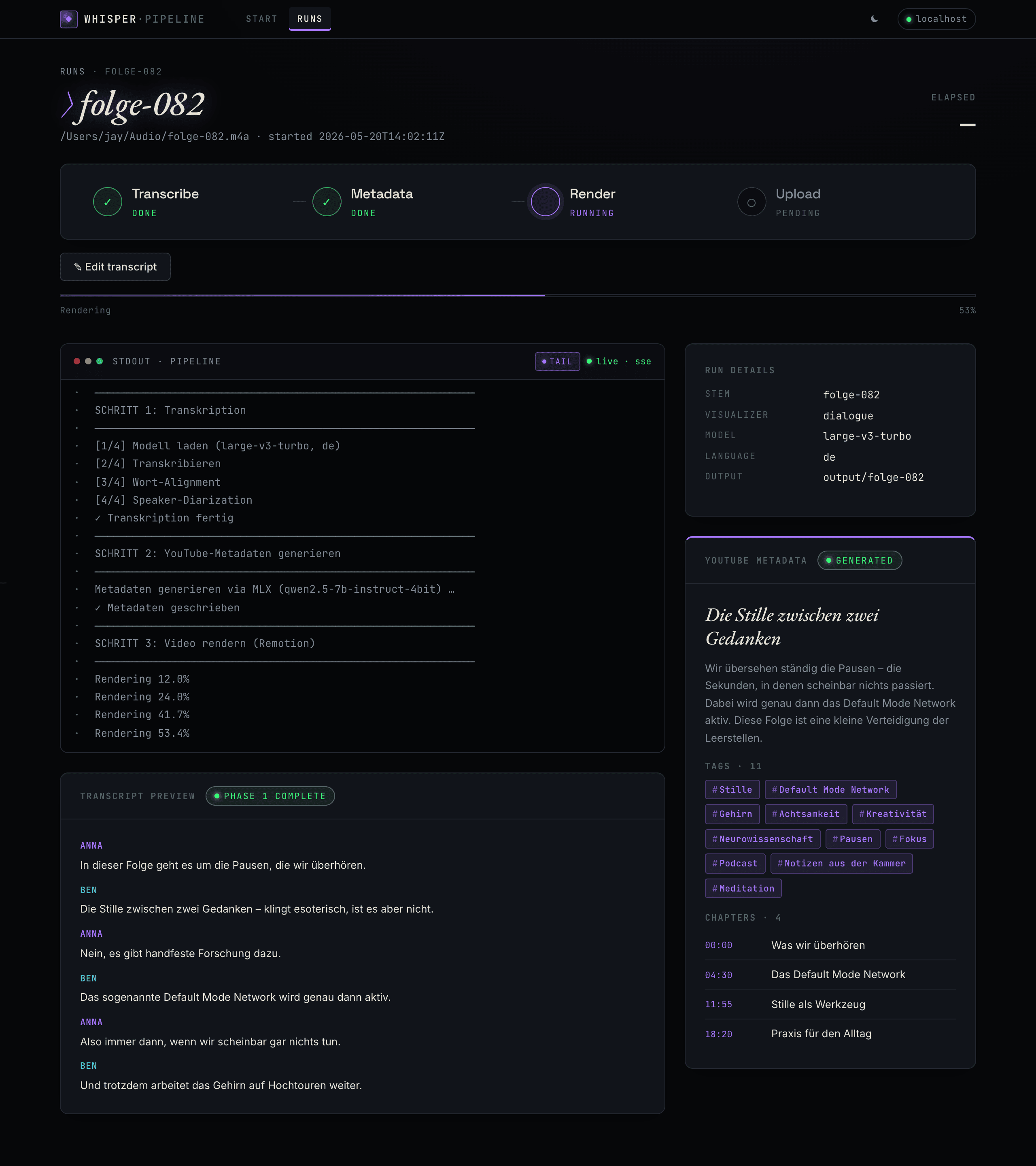
Live run — phase stepper, streaming log, transcript & metadata as they land. |
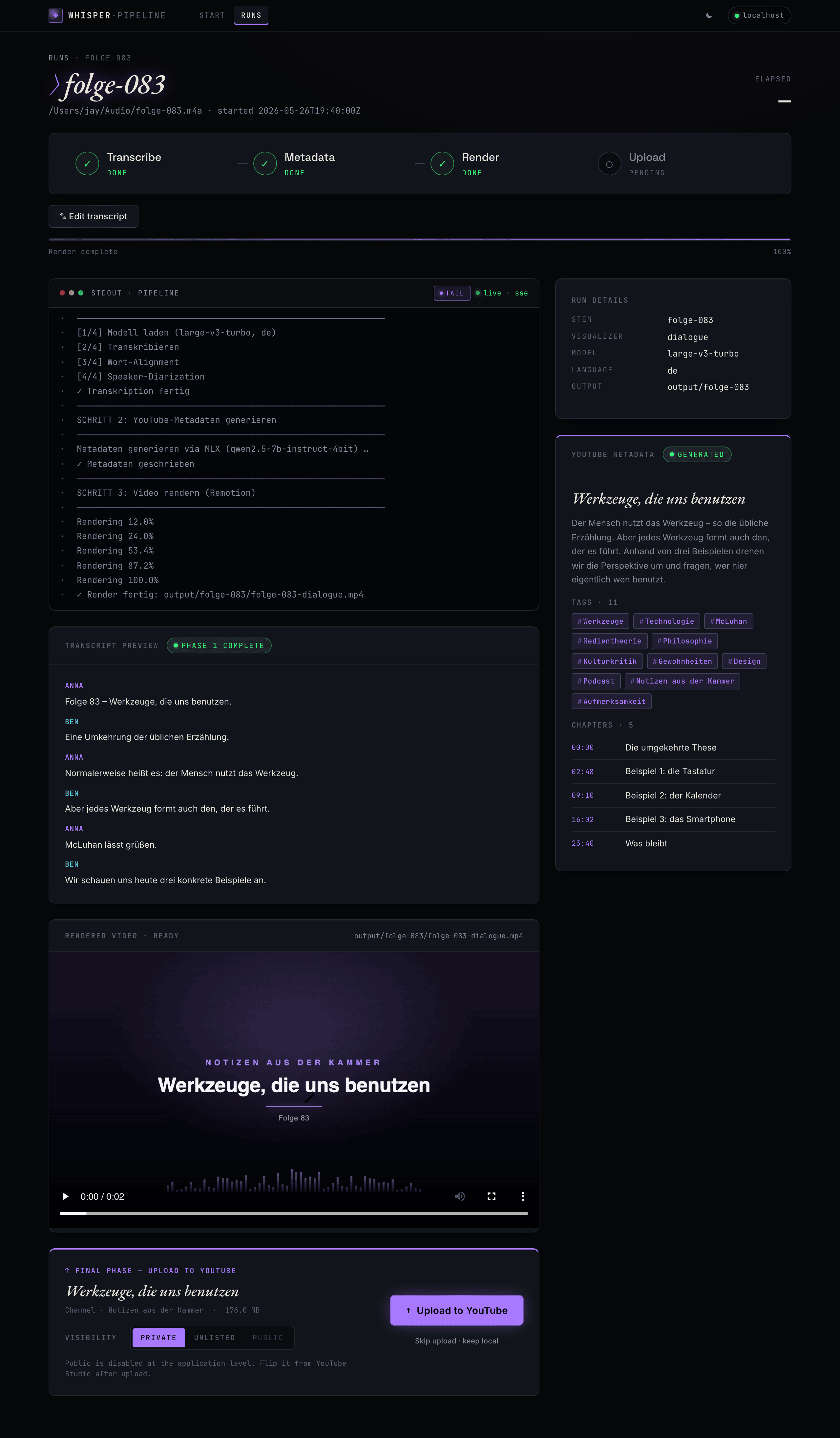
Ready to upload — render preview ready; you pick visibility and confirm. Never automatic. |
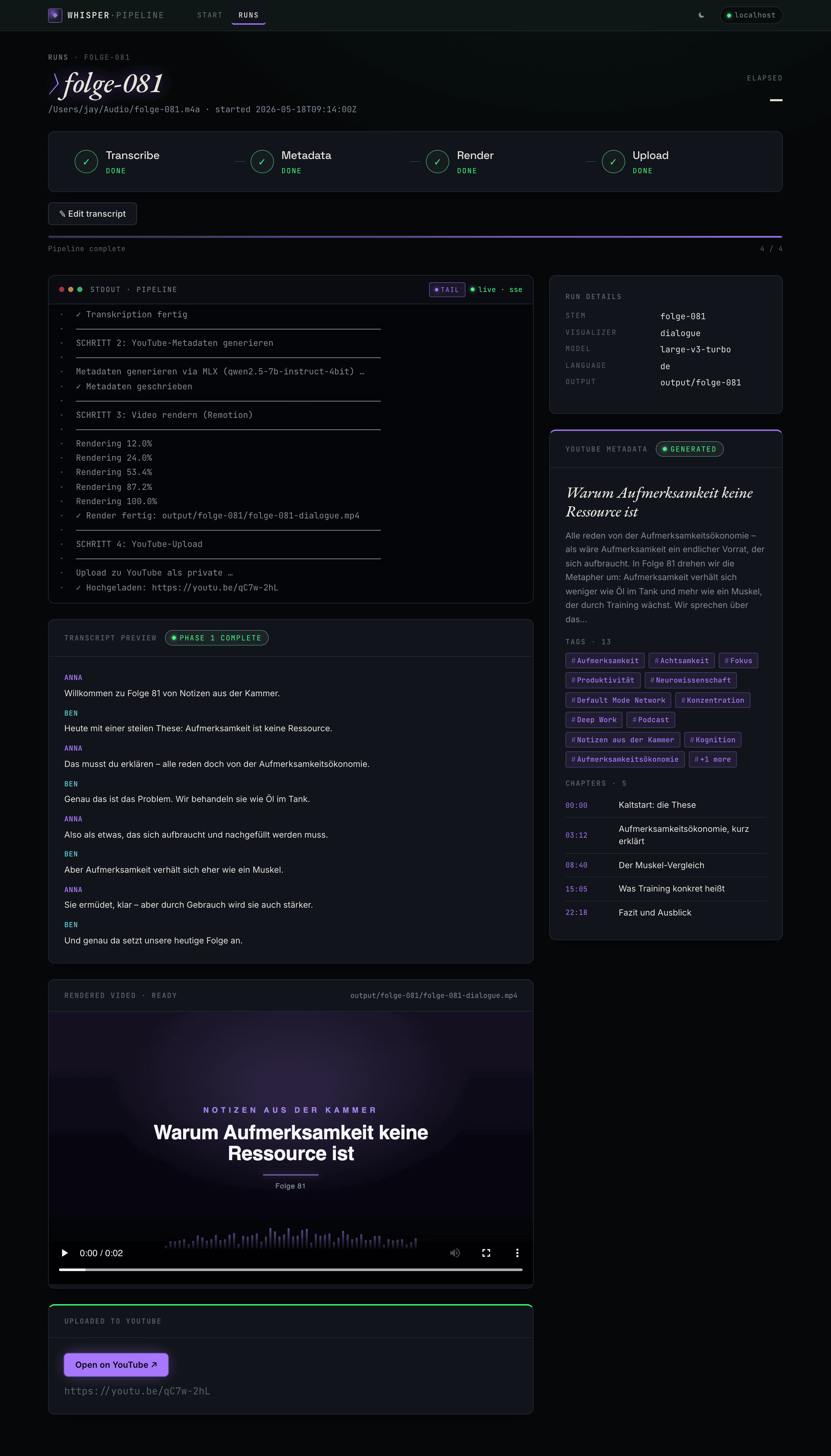
Done — all four phases complete, video rendered and uploaded. |
| Key | Action |
|---|---|
Ctrl+R |
Open the start-pipeline dialog |
Ctrl/Cmd+Z |
(on edit page) Undo the last editor action — native field-undo wins while a text input is focused |
Ctrl/Cmd+S |
(on edit page) Save & return to the run page |
Transcript editor
Whisper occasionally mistypes names, jargon, and foreign words. Rather than re-running the whole pipeline, the editor lets the transcript be corrected between phases and reruns only what changed.
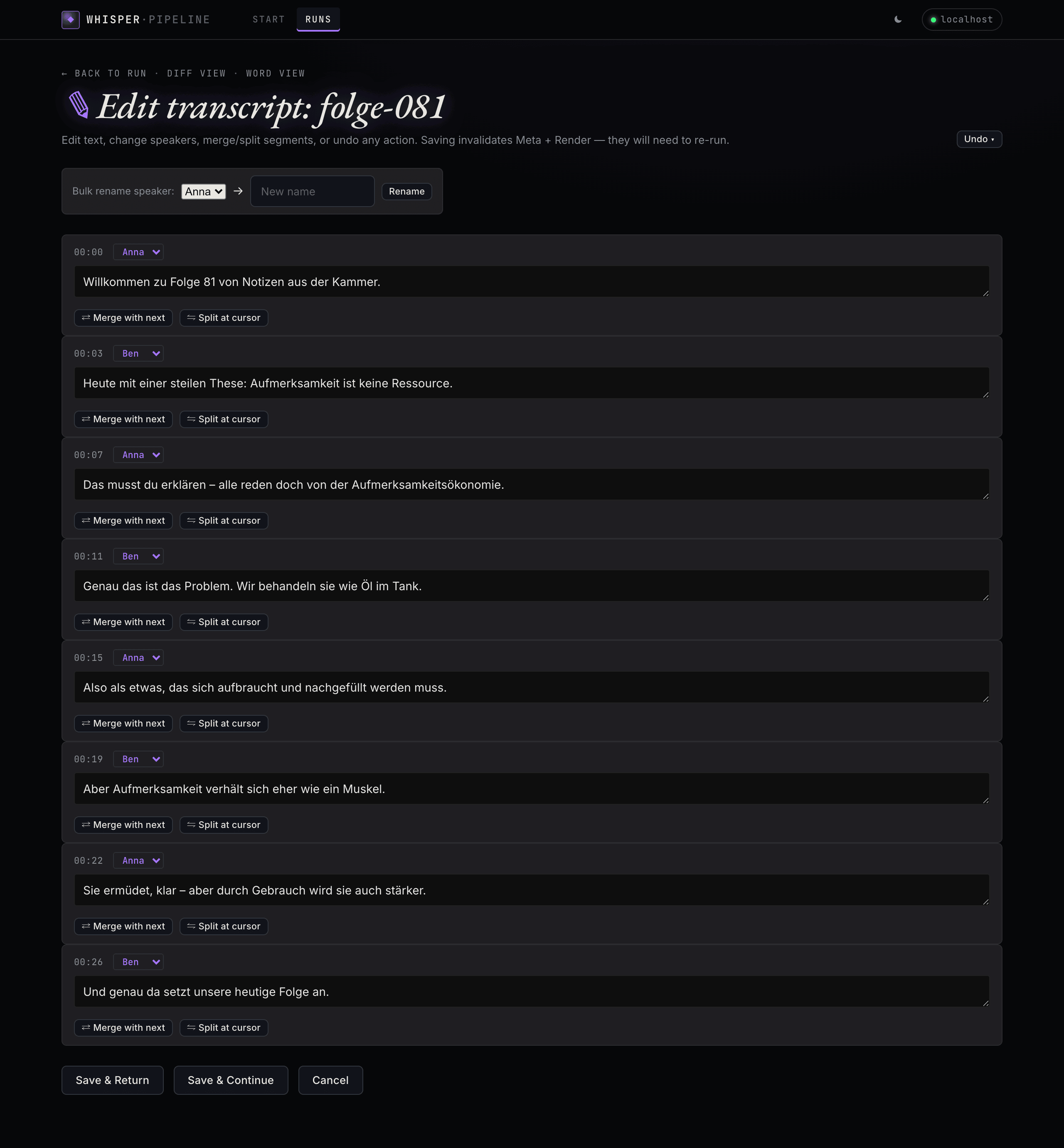
Transcript editor — per-segment text and speaker edits, merge/split, bulk speaker rename, and undo. Saving reruns only the affected phases.
Two ways in:
- Pause after transcribe — tick the Pause after transcribe for editing checkbox on the start form. The pipeline stops after Whisper finishes; the run page surfaces an Edit Transcript button.
- Edit anytime — every run with a transcript exposes an Edit transcript link on the run page. Saving an edit resets the
meta+renderphases topending; click the phase indicator to re-run them with the corrected transcript.
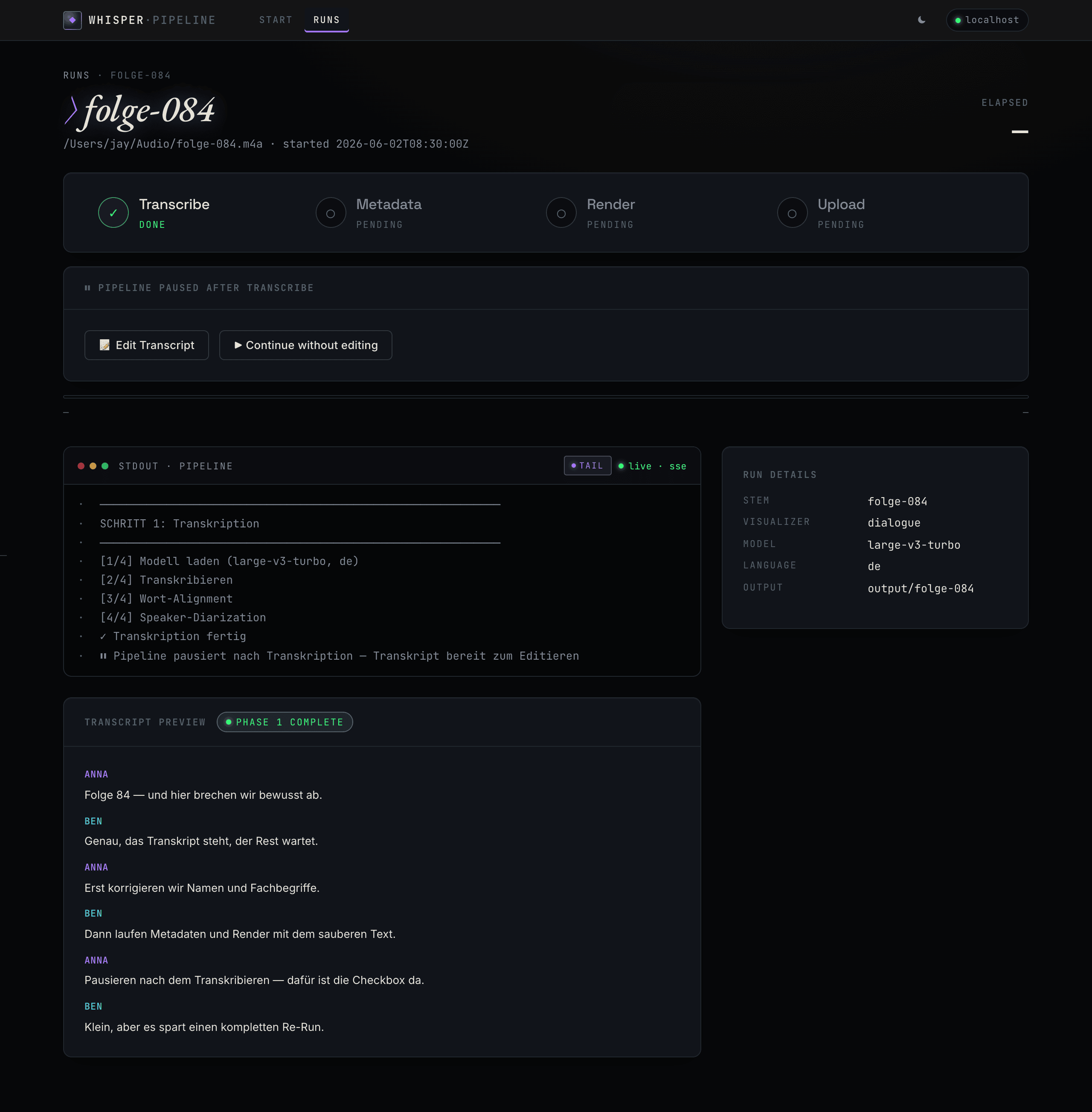
Pause after transcribe — the pipeline stops after Whisper; edit the transcript, then continue with Meta + Render.
What the editor can do:
- Segment text — fix mistyped names, jargon, foreign words.
- Speaker re-labelling — change the speaker per segment, or bulk-rename
SPEAKER_00→Annaacross the whole transcript. - Merge / split segments — combine two consecutive segments or split one at the cursor position.
- Word-level edits —
/runs/<stem>/edit/wordsopens a per-word table for finer-grained corrections. - Diff view —
/runs/<stem>/diffshows original vs. current, word-by-word. - Undo — every action snapshots the prior state. The Undo dropdown shows the recent history;
Ctrl/Cmd+Zreverts the last action.
The first save creates a one-time <stem>.whisperx.original.json backup. Snapshots accumulate in output/<stem>/snapshots/, auto-trimmed to the 20 newest.
CLI
The pipeline also runs headless:
source .venv/bin/activate

# full run — transcribe, metadata, render, upload
python pipeline.py podcast.m4a

# skip the upload
python pipeline.py podcast.m4a --skip-upload

# pick a visualiser
python pipeline.py podcast.m4a --viz dialogue --skip-upload
python pipeline.py podcast.m4a --viz monologue --skip-upload

# speaker diarization (requires accepting the pyannote terms on huggingface.co)
python pipeline.py podcast.m4a --hf-token $HF_TOKEN

python pipeline.py --help
A Textual TUI is kept as a fallback frontend: python tui.py podcast.m4a.
Output lands in output/<stem>/:
<stem>.whisperx.json— word-level transcript with speaker labels<stem>.whisperx.original.json— pristine backup, created the first time the transcript is edited (see Transcript editor)<stem>.srt— subtitles<stem>.txt— plain-text transcript<stem>.youtube-meta.json— title, description, tags, chapters<stem>-<viz>.mp4— the finished video (1920×1080, 30 fps)snapshots/<unix-ts>.json— per-mutation undo snapshots written by the editor; auto-trimmed to the 20 newest
Scripts
| Script | Purpose |
|---|---|
pipeline.py |
Orchestrates all four phases |
transcribe.py |
WhisperX: audio → JSON / SRT / TXT |
generate_meta.py |
MLX LLM: transcript → YouTube metadata |
render_video.py |
Remotion: audio + transcript → MP4 |
upload_youtube.py |
YouTube Data API v3: MP4 → private video |
auth_youtube.py |
One-time OAuth authorisation |
download_models.py |
Pre-fetch all models for offline use |
Configuration
| File | Contents |
|---|---|
client_secrets.json |
Google OAuth credentials (not committed) |
.youtube_token.pickle |
Cached OAuth token (not committed) |
playlists.json |
Playlist auto-assignment — copy from playlists.example.json |
.env |
Optional environment variables |
Environment variables:
MLX_BASE_URL— base URL of the local LLM server (defaulthttp://localhost:8080/v1)MLX_MODEL— the local LLM model idHF_TOKEN— Hugging Face token for speaker diarization
Offline use
python download_models.py pre-fetches the Whisper and alignment models so the pipeline runs without internet (except the upload). --hf-token adds the diarization model; --status shows the cache state.
Test suite
151 unit and integration tests covering the shared pipeline core, the probe and run-history helpers, the job runner, every WebGUI route, and the four transcript-editor modules (transcript_editor, transcript_segment_ops, transcript_word_ops, transcript_history, transcript_diff). Runs in ~3 s on Apple Silicon.
Documentation
The full user manual lives in docs/manual/, organised by Diátaxis:
- Tutorial — your first video, start to finish.
- How-to guides — focused recipes (headless runs, transcript editing, offline models, upload visibility).
- Reference — every CLI flag, WebGUI route, the
run-state.jsonschema, configuration + environment. - Explanation — the four-phase architecture and the design rationale.
Project layout
pipeline.py            Orchestrator — four phases, writes run-state.json
pipeline_core.py       Shared helpers (TUI + WebGUI)
transcribe.py          WhisperX step
generate_meta.py       Metadata step (local MLX LLM)
render_video.py        Render step (Remotion)
upload_youtube.py      Upload step (YouTube Data API v3)
transcript_editor.py        Editor V1 — load / save / regen / invalidate
transcript_segment_ops.py   Editor — merge, split, change_speaker, bulk_rename
transcript_word_ops.py      Editor — load_words_flat, save_word_edits
transcript_history.py       Editor — snapshot, undo_last, cleanup_snapshots
transcript_diff.py          Editor — compute_segment_diff vs .original.json
webgui/                FastAPI app — routes, job runner, SSE, templates, static
webgui.py              WebGUI entry point
tui*.py                Textual TUI (fallback frontend)
visualizer/            Remotion project (Node) — the video renderer
tests/                 pytest suite
docs/                  Design specs, implementation plans, screenshots
tools/                 Dev tooling (e.g. screenshot regeneration)
pyproject.toml         Project metadata, deps, and ruff/mypy/pytest config (uv)
uv.lock                Pinned dependency lockfile
Makefile               Standard targets (install / check / serve / …)
Contributing
Issues and pull requests are welcome on the project's Forgejo instance — the issue templates in .gitea/issue_template/ prompt for everything that's needed. For larger changes, open an issue first. See CONTRIBUTING.md for the development workflow and SECURITY.md for security-sensitive reports.
Project status
Actively maintained by a single contributor. Apple Silicon focus — the pipeline is Mac-only by design. Cross-platform pull requests are accepted but not actively driven.
License
Code: AGPL-3.0-or-later (LICENSE). Documentation: CC BY-SA 4.0 (LICENSE-DOCS).
The AGPL network clause keeps modifications to a networked deployment open-source. A commercial license is available for uses that cannot meet the AGPL terms — see LICENSING.md. External contributions are accepted under the CLA.md.
Copyright (C) 2026 Johannes Kaindl.
Modul-Abhängigkeiten
graph LR
    pipeline --> generate_meta
    pipeline --> render_video
    pipeline --> transcribe
    pipeline --> upload_youtube
    transcript_editor --> transcript_align
    transcript_segment_ops --> transcript_editor
    transcript_word_ops --> transcript_editor
    tui --> tui_app
    tui_app --> tui_cmd
    tui_app --> tui_progress
    tui_cmd --> pipeline_core
    tui_progress --> pipeline_core
    webgui_app --> pipeline_core
    webgui_app --> transcript_diff
    webgui_app --> transcript_editor
    webgui_app --> transcript_history
    webgui_app --> transcript_segment_ops
    webgui_app --> transcript_word_ops
    webgui_app --> webgui_probe
    webgui_app --> webgui_runner
    webgui_app --> webgui_runs
    webgui_app --> webgui_settings
webgui_runner --> pipeline_coreQuelldateien
auth_youtube.pydesign-concepts/tweaks.jsdownload_models.pygenerate_meta.pypipeline.pypipeline_core.pyrender_video.pyscripts/check-no-abs-paths.mjstests/__init__.pytests/conftest.pytests/fixtures/mock_pipeline.pytests/test_pause_after_transcribe.pytests/test_pipeline_core.pytests/test_probe.pytests/test_routes.pytests/test_runner.pytests/test_runs.pytests/test_settings.pytests/test_transcript_align.pytests/test_transcript_diff.pytests/test_transcript_editor.pytests/test_transcript_history.pytests/test_transcript_segment_ops.pytests/test_transcript_word_ops.pytests/test_webgui_edit_routes.pytests/test_webgui_phase2_routes.pytools/screenshots/demo_data.pytools/screenshots/regenerate.pytranscribe.pytranscript_align.pytranscript_diff.pytranscript_editor.pytranscript_history.pytranscript_segment_ops.pytranscript_word_ops.pytui.pytui_app.pytui_cmd.pytui_progress.pyupload_youtube.pyvisualizer/remotion.config.tsvisualizer/src/DialogueComposition.tsxvisualizer/src/Root.tsxvisualizer/src/components/ChamberBackground.tsxvisualizer/src/components/ProgressHairline.tsxvisualizer/src/components/SectionCard.test.tsvisualizer/src/components/SectionCard.tsxvisualizer/src/design.test.tsvisualizer/src/utils/fonts.tsvisualizer/src/utils/speakers.test.tsvisualizer/src/utils/speakers.tsvisualizer/src/utils/timeline.test.tsvisualizer/src/utils/timeline.tsvisualizer/vitest.config.tswebgui/__init__.pywebgui/app.pywebgui/probe.pywebgui/runner.pywebgui/runs.pywebgui/settings.pywebgui/static/app.jswebgui/static/htmx.min.jswebgui.py